
Update fails after download
Posted by GregW on Mar 22, 2026:
I'm having trouble getting Actual Updater Pro to work during the update process. I'm using Actual Installer Pro 10.5 for the installation and Actual Updater Pro 6.0 for the updates. This is my first attempt at using this program, so I assume the problem is with something I'm doing as opposed to the software.
The name of the main executable is ADVMMS2.exe. It has been installed using Actual Installer Pro 10.5.
As update is created and the update.txt file is updated to reflect the file name and new version number for the update.
The main executable is stated, the update available message is displayed, the "Yes" button is pressed to start the updated process.
The ZIP file appears to download.
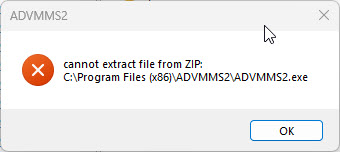
At this point, an error message is displayed. The error message is attached.
I've tried doing the update using both exe and zip files. Both options display the same error.
The update parameters are "-CheckMainExeIfRunSetup -dadmin -LaunchAppAfterCheck -ForceElevate -RunSetupAdmin". For the ZIP file, the update method is set to "Download ZIP and Unpack".
So far, I've spent hours on this trying to get the update to work. Do you have any idea what's causing the error and how I can fix it an get the update to work as expected?
Error message after downloading ZIP file
Replied by Leo on Mar 23, 2026:
Can you check if the file "ADVMMS2.exe" is running during the update process?
If so, then it's strange that the Updater doesn't prompt to close it.
Have you specified this file as the Min Executable in Actual Installer (page Installation / Files and Folders)?
--
Leo,
Softeza Team
Replied by GregW on Mar 23, 2026:
When the program is started using the shortcut (target: "C:\Program Files (x86)\ADVMMS2\Updater.exe" /L "C:\Program Files (x86)\ADVMMS2\ADVMMS2.exe"), the Updater dialog is displayed. According to Task Manager, the ADVMMS2.exe is not running. The ZIP file is downloaded. After it's downloaded, the "cannot extract file from ZIP" error is displayed. The update settings that have been selected are shown below.
Include 'Actual Updater' tool (6.0.0.0)
URL points to the update.txt file.
Check for updates before installation.
Use Product Name as Updater title.
Update Method: Download ZIP and Unpack
Use Downloader
Automatically check for updates on Main Executable Launch (via shortcut)
Updater parameters: -CheckMainExeIfRunSetup -dadmin -LaunchAppAfterCheck -ForceElevate -RunSetupAdmin
I did a test where I renamed ADVMMS2.exe to ADVMMS2.exx in the ZIP file. Once I did that, the update worked as expected. However, since the main executable has the wrong extension, the program hasn't really been updated.
That narrows the problem down to some type of issue with the main executable not being able to be updated. It doesn't appear to be in use during the update process, at least according to Task Manager.
Any ideas as to what the problem is?
One way to resolve this might be to add an option to updater to allow it to call an external batch file instead of the main executable. If the batch file is passed the full path to install location and the name of the main executable the batch file could rename the exx file to exe and then start the main executable. This would also allow the batch file to take care of other tasks after the update and before the main executable starts (e.g., delete obsolete files). Just a thought.
Replied by Leo on Mar 25, 2026:
Thank you for this information.
We will try to add a feature to run a command (batch file) during the update process.
You say that when the error appears, the main exe (ADVMMS2.exe) is not running, this means that the file may be in use by another process.
Can you make a test - when this error appears, try to manually rename this file. Does a message appear indicating that the file is being used by another process?
Also, try to add this parameter: -ZipForceClose
If not help, try to remove the parameters: -ForceElevate -LaunchAppAfterCheck
--
Leo,
Softeza Team
Replied by GregW on Mar 26, 2026:
Thanks for the update. Here's are the latest.
After the download when Updater.exe takes over and the "cannot extract file from zip" error message is displayed I can delete the executable (while the error dialog is still displayed). I'm not sure why updater can't delete it. This program is using NET 10. Could that be causing a problem? I don't know why it would, but since NET 10 is relatively new, it might be a possibility.
Adding and removing the suggest parameter options didn't solve the problem.
I created a test app to do further testing on this. The test app has the same problem when preforming an update. On rare occasions the update will work as expected. Most of the time it displays the error. If you want, I can upload the test app and install project (Test.aip).
I've temporarily worked around the problem by including an update.cmd and updatecleanup.cmd in the update ZIP file. I rename the executable extension from exe to exx in the ZIP. This allows the updater to update the files. When the updater starts the application starts it checks for the presence of update.cmd. If found, it starts the batch file and shuts down. The batch file deletes the exe file and renames the exe extension to exx. The update.cmd file then calls updatecleanup.cmd which deletes the update.cmd file and starts the main executable. For now, it will work but it would be nice to figure out why updater can't update the main executable.
Replied by Leo on Mar 28, 2026:
Thank you for these details.
Yes, please send a download link for the setup file and project file.
You can send it at info [at] actualinstaller.com
--
Leo,
Softeza Team
Replied by GregW on Mar 30, 2026:
I sent the links and documentation to your email. If you have problems downloading the file, please let me know.
Replied by Leo on Mar 31, 2026:
I've successfully tested your project - the app is updated without error messages.
I still assume that the main exe file was in use by some process, maybe your antivirus - try to temporarily disable it next time.
We will also add in a new version: a delay before checking if the main exe is running and Retry button (in the ZIP extraction error dialog box).
Some notes:
1. in your update.txt file, the release notes are listed as:
[1.10.2603.0000]
0=Original install
[1.10.2603.0001]
0=Update test
The latest release must be at the top:
[1.10.2603.0001]
0=Update test
[1.10.2603.0000]
0=Original install
2. The feature "Check for Updates before Installation" will not work if use the update Method "Download ZIP and Unpack" or "Download Main Exe only", because the app is not installed yet (before installation).
We'll add a notice for this.
--
Leo,
Softeza Team
Replied by GregW on Mar 31, 2026:
You could be right about something holding a temporary lock on the file. The fact I can delete the file while the dialog is still open probably means something (e.g., antivirus) is holding a short-term lock, long enough to cause updater.exe to fail but short enough that I can manually delete the file seconds after updater.exe fails.
Let me know when you have an updated program and I will try it. I can replicate the updater.exe issue roughly 9 times out of 10 so I should know pretty quick if the change works.
Thanks for the reply and the notes.
Replied by Leo on Apr 14, 2026:
Please try the new release 6.1 (the download link sent to your email).
Added some additional checks when extracting files from zip, new error codes, Retry button on error message, and more:
Actual Updater 6.1
--
Leo,
Softeza Team
Replied by GregW on Apr 14, 2026:
I downloaded the new version of Updater. When I started the Actual Installer, it asked me if I wanted to update it. I answered yes. The version I have are Actual Installer 10.6 and Updater.exe 6.1.
I tested the update process 4 times on the main application.
Test #1: The update of the same the new updater.exe failed with the same cannot extract file. I selected Retry twice and it failed both times. Between the second and third Retry, I manually deleted the main executable (ADVMMS2.exe). While trying to delete the executable, I received the Windows "File Access Denied" dialog (screen shot attached). I deleted the file. I then clicked Retry and the update was successful.
Test #2: The update worked as expected. The Retry button was not displayed.
Test #3: Same as test #2.
Test #4: Same as test #2.
I will perform additional update tests over the next few days to see if tests #2 through #4 are the norm or if test #1 randomly keeps happening. It's definitely working better than before.
One comment I have is there's a long delay between the time the download is complete, and the updater dialog displays "the program has been successfully updated" message. The delay is 15 plus seconds. The biggest problem with the delay is nothing is being displayed between the time the downloader dialog closes the updater dialog is displayed. Any kind of "please wait, program is being updated" or similar message would be appreciated during the delay so the user knows something is happening.
Replied by Leo on Apr 15, 2026:
Thank you for this information.
The update progress dialog is already in our to-do list.
We'll add it in the next version.
--
Leo,
Softeza Team
Post Reply
Use the following form to submit a request to post a reply. Registration is not required.
Messages are moderated. Spammers won't get through.